
Sileo · Troubleshooting
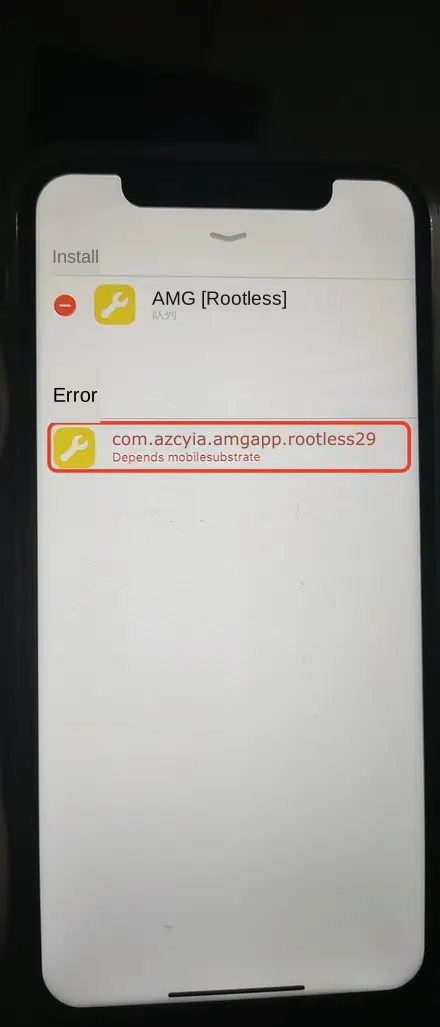
Symptom: after tapping Confirm, a red error row appears in the queue, for example:
A red "Error" appears while installing
com.ssoes.amg567.rootless1899Depends mobilesubstrate
Cause: Depends xxx means this package depends on xxx, but Sileo cannot find it right now. The usual reason is that the source list did not finish refreshing, so Sileo has no information about the dependency package yet. mobilesubstrate is the dependency name for the tweak injection framework, and on rootless jailbreaks it is normally provided by ElleKit.
What to do:
Close the queue with the button in the top-right corner, or tap Clear Queue.
Tap Sources at the bottom, then pull down on the list to refresh, and wait for the progress bar under every source to finish.
Refresh once more and confirm no source is showing a red error.
Go back to the package page and repeat Get → Queue → Confirm.
If the same error comes back after refreshing:
Search for
ElleKitin Sileo Search and check whether it is installed. If not, install ElleKit first, then the product.Check that the build matches your jailbreak: rootless jailbreak takes the rootless build, rootful takes the rootful build.
Other dependency errors (
Depends some-package) work the same way: refresh sources first, and if that fails, install the missing package on its own first.
Adding a source reports it is invalid or cannot be verified
Copy the address again from the Overview page. Note whether it is
httporhttps, and do not leave extra spaces.Turn off your VPN or switch networks and try again.
Refresh an existing source first to confirm Sileo's own network access works.
One source fails while refreshing
If red text appears under a source, or you see status codes such as 404, 403, 500 or 503, that repo is temporarily unreachable:
Switch networks (Wi‑Fi to cellular, or the other way round) and refresh again.
If it keeps failing, the repo server is most likely under maintenance. Refresh later — your other sources keep working.
"Expected size xxx, got xxx"
The downloaded file size does not match what the repo reports, usually because the cache is stale. Swipe Sileo away from the app switcher, reopen it, pull down on the Sources screen to refresh, then install again.
"dpkg was interrupted"
A previous install or removal did not finish cleanly. Reboot the device, re-jailbreak, open Sileo and try the operation once more.
"trying to overwrite …, which is also in package …"
The package you are installing shares files with something already on the device — typically the same product installed as a different build. Uninstall the old version in Sileo first, respring, then install the new one.
You tapped Get in the queue, but "Confirm" is greyed out
The queue probably contains a conflict or an unfinished download. Tap Clear Queue and keep only one package before confirming.
Cannot find the product, or finding it but installation fails
Pull down on the Sources screen to refresh, then search again.
Build does not match the jailbreak: a rootless environment with a rootful build, or the reverse.
The device is low on storage.
Swipe Sileo away from the app switcher, or reboot the device, then retry.
Installed, but there is no icon on the home screen
Always tap Restart SpringBoard when installation finishes.
On environments such as Dopamine you may need to refresh tweaks inside the jailbreak app, or respring, before the icon appears.
The tweak still works after uninstalling
Make sure you removed it in Sileo rather than just deleting the home screen icon. You must restart SpringBoard after removal; if it is still active, reboot the device and re-jailbreak.
Refreshing sources is very slow
Too many sources slows the refresh down. Keep only the AZ repo https://apt.azcydia.com plus the official repo you actually use.
The interface and supported systems may change with updates. Back up important data before cleaning, resetting or deleting anything.