
AMG · User guide
AMG supports one-tap device refresh, identifier cleanup, full backup, location spoofing and scripting.
| Item | Details |
|---|---|
| Repo | https://apt.amgapp.cn |
| Supported iOS | iOS 8 to iOS 16 |
| Jailbreak | Rootful / Rootless / RootHide (Unc0ver, Checkra1n, Palera1n, Dopamine, RootHide and others) |
Main screen
The main menu once you open AMG:
| Menu | What it does |
|---|---|
| Device info | View the device parameters currently being spoofed |
| Target apps | Tick the apps you want to spoof |
| Backup records | View, restore and manage previous records |
| Reset | Generate a new device using the current settings |
| Original device | Turn off all spoofing and return to the real device |
| Settings | Location, parameters, airplane mode and so on |
| Toolbox | Data import / export and utilities |
| About | Version and license information |
The current IP address is shown at the bottom of the main screen.
Basic operations
1. Tick the target apps
Before resetting you must tick the apps you want to spoof under Target apps. Unticked apps are left alone.
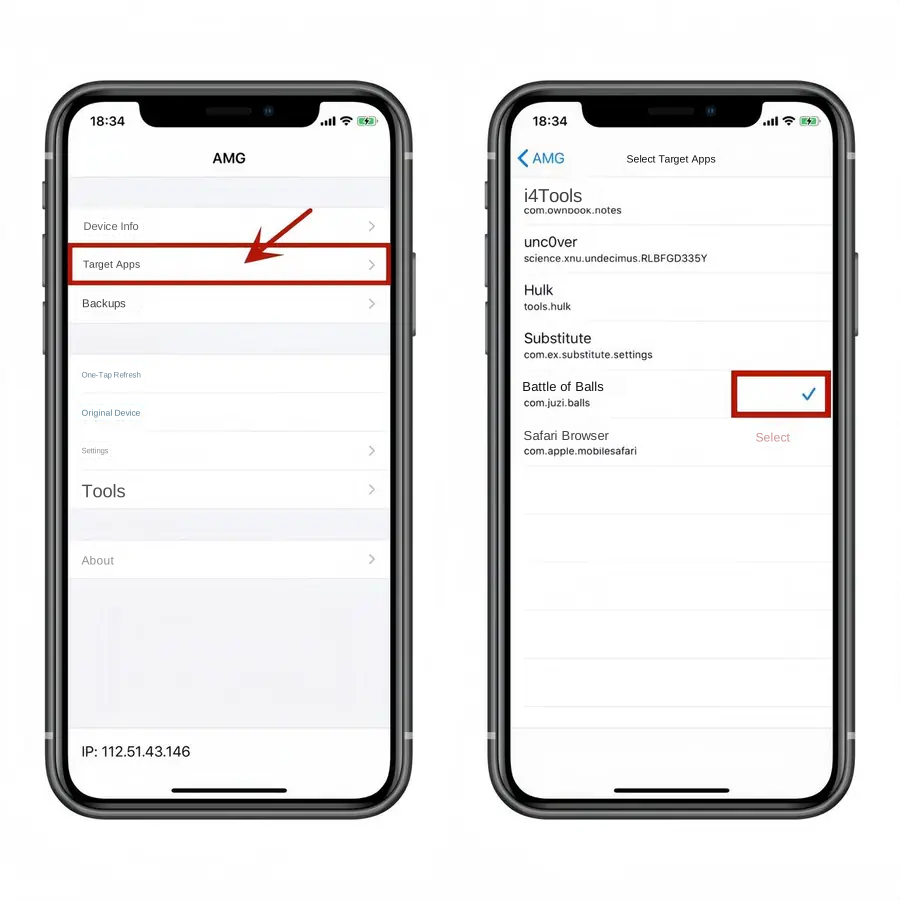
2. Reset
Go back to the main screen, tap Reset and wait for it to finish.
3. Smart airplane mode
When enabled, every reset or record switch toggles airplane mode once, which resets the network IP.
4. IP change warning
If the IP did not change after a reset or record switch, the IP at the bottom of the main screen turns red to warn you. Switch networks manually before trying again.
Location simulation
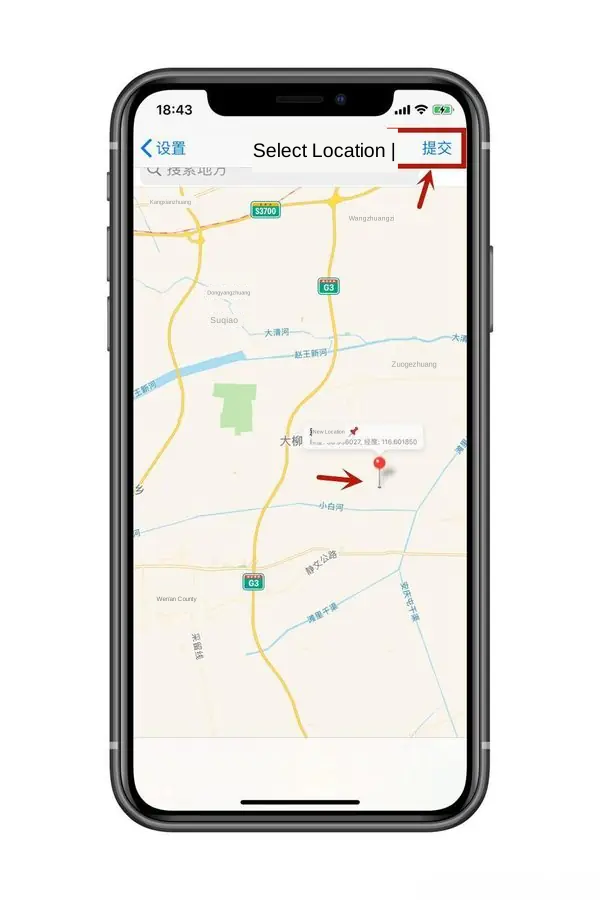
| Setting | Effect |
|---|---|
| Random location on | A random location anywhere in the country on every reset |
| Random location off | Location stays at the last coordinates you set |
| Manual location | Turn the random switch off → tap a point on the map → tap Submit |
| Smart offset | Shifts the position a short random distance from the target, which lowers risk-scoring |
Spoofing device parameters
Multi-select random: iOS version, device model, network type and carrier can each be multi-selected. A reset then picks one value at random from your selection.
Fixed parameters: to pin a value, select only one option in that menu.
Anti-jailbreak detection: the deep mode can make some apps crash, so enable it case by case.
Backup and migration
Tap Toolbox on the main screen to reach data import and export. Before importing you must create the matching folder yourself and put the data inside.
| Data source | Device path | Toolbox button |
|---|---|---|
| NZT data | /var/mobile/iGrimace | Import other data |
| AWZ data | /var/mobile/importdata | Import AWZ data |
| AMG backup (import) | /var/mobile/AMG_tar | Import AMG data |
| AMG backup (export) | /var/mobile/AMG | Export AMG data |
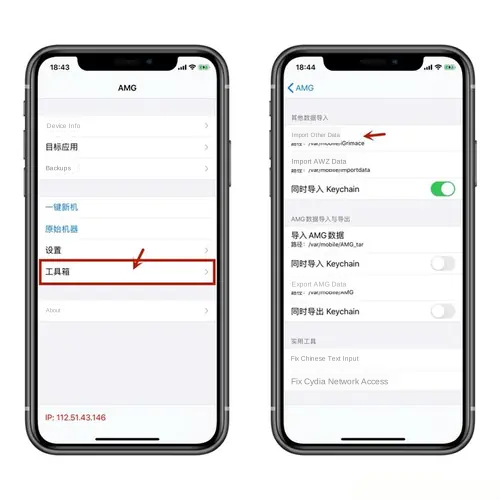
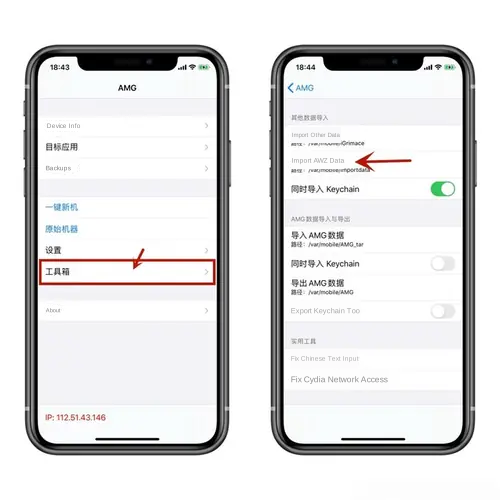
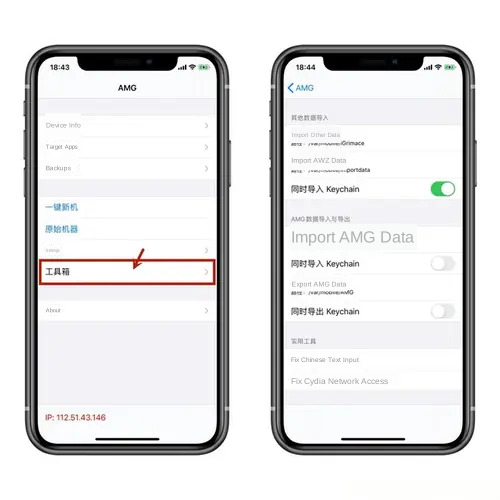
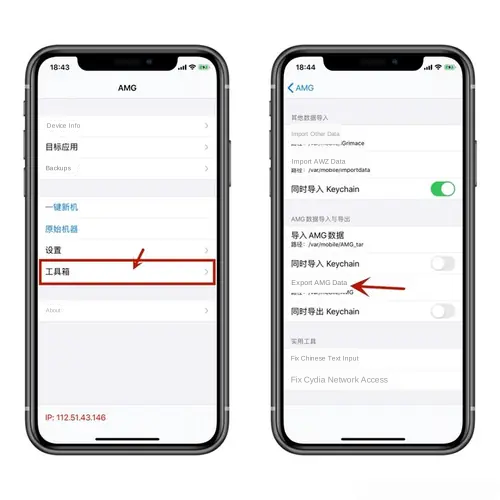
Every import and export button has an "also import / export Keychain" switch underneath it.
Toolbox utilities
| Tool | What it does |
|---|---|
| Fix Chinese input | Repairs a Chinese keyboard that will not work |
| Fix Cydia network on China models | Restores network permission for Cydia on mainland-China devices |
Tips
Start with default settings. Run one reset with defaults, confirm the target app opens normally, then enable more options step by step.
Check before restoring. Always confirm the right apps are ticked under Target apps before restoring a record.
Storage. Backups copy app data, so make sure the device has enough free space.
Keychain. Do not enable "also import Keychain" unless the app will not open after importing, and never use it when moving data between devices.
FAQ
The IP at the bottom of the main screen turned red after a reset?
That means the IP did not change after the reset or record switch. Switch networks manually (or turn on smart airplane mode) and try again.
The device cannot reach Wi-Fi or a computer after importing data?
This is usually caused by "also import Keychain". Unless the app will not open after importing, turn that switch off.
App data looks wrong after restoring a record?
Check whether the app is ticked under Target apps — unticked apps are not restored.
The app crashes after enabling deep anti-jailbreak detection?
Some apps are incompatible with the deep mode. Turn it off and try again.
For scripting, see the AMG API.
The interface and supported systems may change with updates. Back up important data before cleaning, resetting or deleting anything.